Have you ever clicked on a website and closed it before it even loaded? You’re not alone — and your visitors are doing the exact same thing to slow websites every single day. In a world where everything moves fast, nobody has the patience to wait for a slow page. Website loading speed is one of those things that quietly makes or breaks your entire online presence.
It affects how users feel, how long they stay, and whether Google even bothers showing your site in search results. The difference between a fast site and a slow one can mean the difference between a sale and a lost customer. And the scariest part? Most website owners don’t even know their site is slow until it’s already costing them. This guide breaks it all down simply — so you know exactly where you stand and what to do about it.
What Is Website Loading Speed and Why Does It Matter?
Website loading speed is simply how fast your web pages load and become usable for a visitor. It’s measured in seconds — and even a difference of one or two seconds can completely change how people experience your site.
Think about it from a user’s perspective. If a page takes more than three seconds to load, most people just leave. They don’t wait. They don’t come back. They just go to the next result on Google. That means slow loading speed doesn’t just frustrate visitors — it costs you real customers and real money every single day.
Google’s Benchmarks — What Is a Good Loading Speed in 2026?
Google is very clear about what it considers a good loading speed. The main metric they use is called LCP — Largest Contentful Paint — which measures how long it takes for the biggest visible element on your page to fully load.
Here’s what Google’s benchmarks look like in 2026:
- Good — LCP under 2.5 seconds
- Needs Improvement — LCP between 2.5 and 4 seconds
- Poor — LCP over 4 seconds
The goal is to keep your LCP under 2.5 seconds on both desktop and mobile. If you’re hitting that target, you’re in good shape. If not — keep reading, because we’ll show you exactly how to fix it.
How Website Loading Speed Affects SEO and Rankings
Google has officially confirmed that page speed is a ranking factor. That means if your website loads slowly, you’re not just losing visitors — you’re also losing positions in search results. And lower rankings mean less traffic, fewer leads, and less revenue.
Google now measures speed using real data from actual visitors through something called Core Web Vitals. These are a set of performance signals that look at loading speed, interactivity, and visual stability. If your scores are poor, Google will rank faster competitors above you — even if your content is better. Speed and SEO are completely connected in 2026.
How Website Loading Speed Affects User Experience and Sales
Speed isn’t just an SEO issue — it’s a business issue. Studies consistently show that a one-second delay in loading time can reduce conversions by up to 20%. That means if your store is making AED 10,000 a month, a slow website could be quietly costing you thousands in lost sales.
On top of that, 79% of shoppers who have a bad experience with a slow website say they’re unlikely to buy from that site again. First impressions happen fast online — and your loading speed is part of that first impression. A fast website feels professional and trustworthy. A slow one feels broken and unreliable.
How to Test Website Loading Speed
You can’t fix what you don’t measure. The good news is that testing your website speed is completely free and takes less than a minute. Here’s how to do it properly.
Check Website Load Speed With Free Tools
The best free tools to check website load speed are Google PageSpeed Insights, GTmetrix, and Pingdom. Just enter your URL and within seconds you’ll get a full report showing your loading time, your Core Web Vitals scores, and a list of specific issues to fix.
Google PageSpeed Insights is the most important one to use because it shows you the exact data Google uses to evaluate your site. GTmetrix is great for more detailed technical breakdowns. Use both for the clearest picture.
Mobile Website Load Speed Test — Why Mobile Matters More
Most of your visitors are coming from their phones — so your mobile speed matters even more than desktop. Always run a mobile website load speed test separately because mobile pages often load much slower than desktop versions due to smaller screens, slower networks, and heavier page elements.
Google’s PageSpeed Insights automatically shows you both mobile and desktop scores. If your mobile score is low, that’s the one to fix first. A slow mobile experience is one of the biggest silent killers of traffic and conversions in 2026.
How to Read Your Website Page Load Speed Test Results
When you run a website page load speed test, you’ll see a score from 0 to 100. Anything above 90 is excellent. Between 50 and 89 is okay but needs work. Below 50 means your site has serious speed issues that are likely hurting both your SEO and your user experience.
Don’t panic if your score is low — the tools also give you a prioritized list of exactly what to fix. Focus on the issues flagged as high impact first, and work your way down from there.
Most Common Reasons Your Website Is Loading Slow
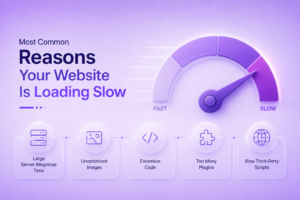
Before you start fixing things, it helps to understand what’s causing the slowness in the first place. Here are the most common culprits:
- Large unoptimized images — Big image files are the number one cause of slow websites
- Too many plugins — Every plugin adds extra code that the browser has to load
- Cheap or slow hosting — Your hosting server plays a huge role in how fast your site loads
- No caching set up — Without caching, every visitor has to reload everything from scratch
- Too much JavaScript — Heavy scripts slow down how quickly the page becomes usable
- No CDN in use — Without a content delivery network, visitors far from your server get slower load times
Most slow websites have more than one of these issues going on at the same time. The good news is that fixing even two or three of them can make a noticeable difference.
How to Improve Website Loading Speed — Step by Step
Now let’s get into the practical fixes. Here’s a simple process you can follow to improve website loading speed without needing to be a developer.
Step 1 — Compress your images. Use a tool like TinyPNG or ShortPixel to reduce image file sizes before uploading them. This alone can cut your loading time significantly.
Step 2 — Enable caching. Caching stores a version of your page so returning visitors don’t have to reload everything. On WordPress, plugins like W3 Total Cache or WP Rocket handle this easily.
Step 3 — Minify CSS and JavaScript. This removes unnecessary spaces and characters from your code, making files smaller and faster to load. Most caching plugins handle this automatically.
Step 4 — Upgrade your hosting. If you’re on cheap shared hosting, moving to a faster VPS or managed hosting plan can make a dramatic difference overnight.
Step 5 — Use a CDN. A content delivery network stores copies of your site on servers around the world, so visitors get served from the closest location. Cloud flare offers a free CDN that works well for most websites.
Step 6 — Reduce plugins. Go through every plugin on your site and delete the ones you don’t actually need. Fewer plugins mean less code and faster loading.
How to Speed Up Website Loading Time on a Tight Budget
Not everyone has the budget to hire a developer or upgrade their entire hosting setup. The good news is that you can speed up website loading time without spending a lot of money — or any money at all.
Start with the free wins first. Compress your images, install a free caching plugin, and sign up for Cloudflare’s free CDN. These three steps alone can take a slow website from five or six seconds down to under three seconds in many cases. After that, test again using a website load test page speed tool, see what issues remain, and tackle them one by one. Small, consistent improvements add up fast.
Final Thoughts
Website speed isn’t a technical detail that only developers need to care about. It’s a business priority that affects your SEO, your sales, your reputation, and how every single visitor experiences your brand. The faster your site, the more people stay, the more they trust you, and the more they buy.
If you’ve tested your site and you’re not happy with the results — or if all of this feels too technical to handle on your own — that’s exactly where we come in. Our team audits, optimizes, and fixes website performance issues for businesses every day. Don’t let a slow website cost you customers you don’t even know you’re losing. Let’s fix it together — get in touch today and we’ll take it from there.
FAQs
What is a good website loading speed in 2026?
According to Google, a good loading speed means your page loads in under 2.5 seconds. Anything between 2.5 and 4 seconds needs improvement, and anything over 4 seconds is considered poor.
Does website loading speed affect SEO rankings?
Yes — Google officially uses page speed as a ranking factor. Slow websites rank lower in search results, which means less traffic and fewer customers finding your business online.
How can I test my website loading speed for free?
You can use Google PageSpeed Insights, GTmetrix, or Pingdom. Just enter your website URL and you’ll get a full speed report with scores and a list of issues to fix — completely free.
Why is my website loading slowly?
The most common reasons are large unoptimized images, too many plugins, slow hosting, and no caching set up. Fixing even two or three of these issues can make a big difference to your loading time.
Can I speed up my website without spending money?
Yes. Compressing your images, installing a free caching plugin, and setting up Cloudflare’s free CDN can significantly improve your loading speed without spending a single penny.